
Running the crawl is the easy part. I have a whole breakdown of 10 SEO site crawl tools and which one to reach for, but the honest truth is that the tool matters a lot less than what you do in the hour after the crawl finishes. Most people export 40,000 rows, feel the weight of it, and quietly go back to writing blog posts.
So I asked Peter Nikolow of Mobilio Development a deliberately narrow question: when you finish a crawl, what are the top two most valuable and actionable things you look at? Peter spends more time inside crawl data than almost anyone I know, and his answer was longer than two items and better than two items.
Then I went back through the transcripts of the Unscripted SEO Podcast and pulled every place a guest talked about what they do with the same export. Peter’s list is the spine of this piece. The rest of the guests fill in the argument — and in one case, push back on it.
The short version
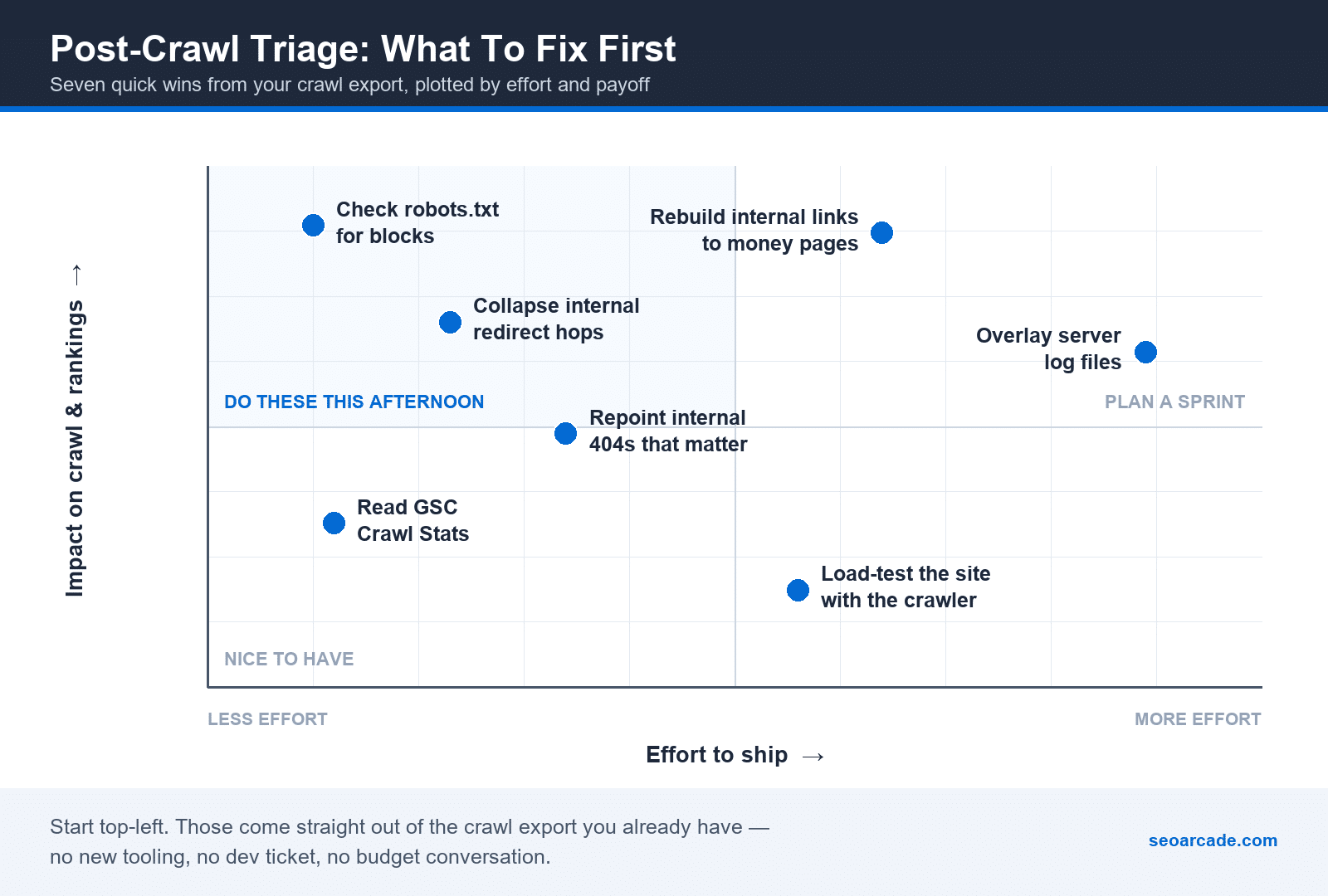
If you only have an afternoon, work the top-left quadrant: robots.txt, redirect hops, the 404s that actually matter, and the Google Search Console crawl report. None of them need a new tool, a dev ticket, or a budget conversation.
1. Collapse your internal redirect hops
Peter’s first item, verbatim:
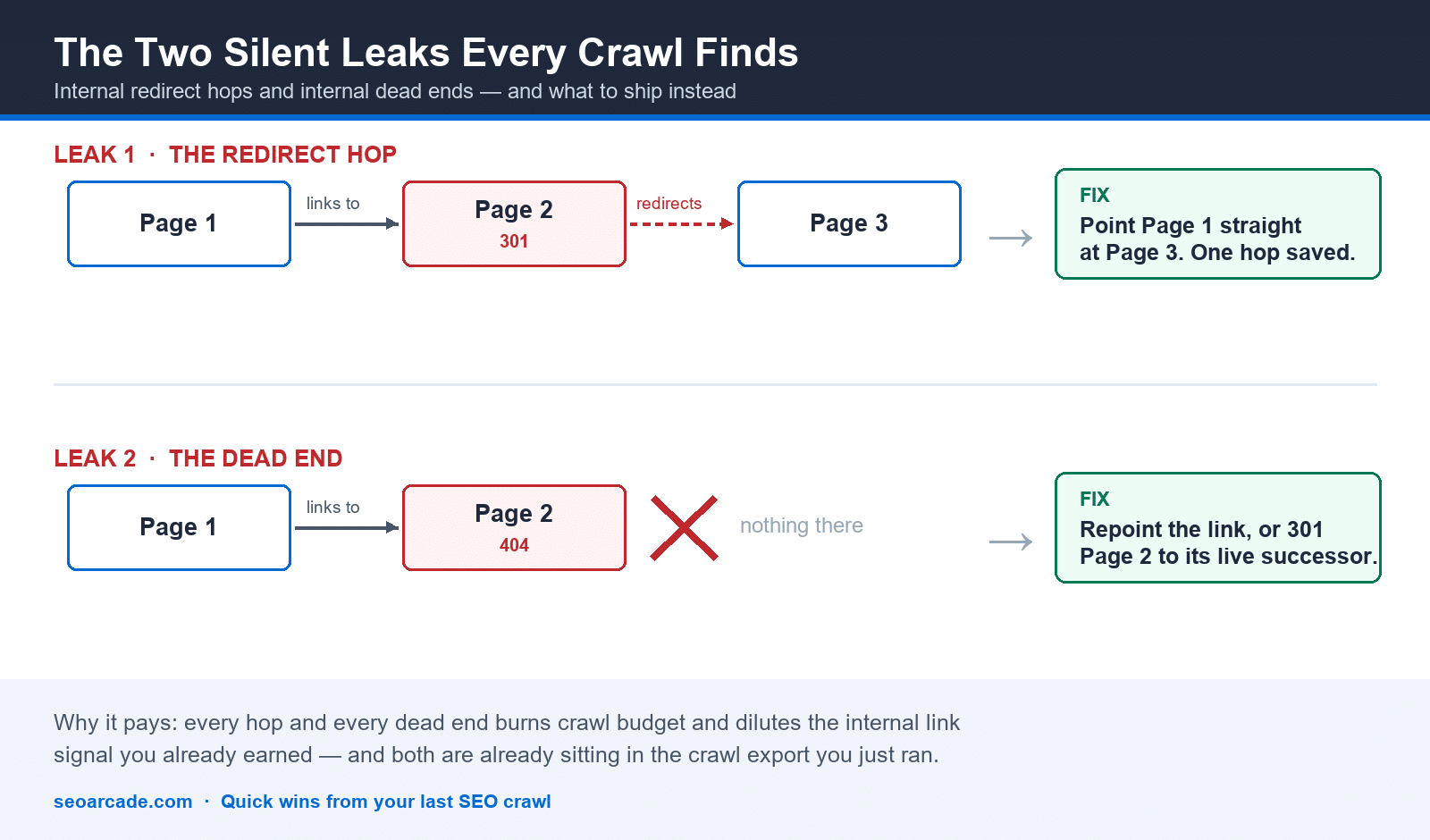
Eliminate internal redirects: Page1 links to Page2. Page2 redirects to Page3. You should make it like Page1 → Page3
Peter Nikolow, Mobilio Development
This is the least glamorous fix in SEO and one of the highest-yield ones. Every internal link pointing at a URL that 301s is a link you are paying for twice: once in crawl budget, once in whatever signal dilution you believe happens across a hop. Your crawler already has this list — it is the report where status code is 301 and the inlink source is your own domain.
The fix is a find-and-replace in the source of the linking pages, not a redirect rule. Leave the 301 in place for external links and old bookmarks. Just stop pointing your own navigation, body copy, and footers at it.
2. Kill internal 404s — but not all of them
Peter’s second item is the mirror image:
Eliminate internal 404s: Page1 links to Page2. But Page2 is 404.
Peter Nikolow, Mobilio Development
Jeff Stirland described the same loop as ongoing maintenance rather than a one-time cleanup: “if the 404s exist, we wanna add 301 redirects to make sure they go to an existing page. Those are kind of the two upkeep tasks out of Google Search Console.”
Here is where a guest pushed back, and it is the most useful thing in this article. Eva Mermingi, who came up doing technical audits, does not think a clean 404 report is the goal:

Her full framing: “especially in the beginning of my career … I thought, oh my god, yeah, we need to clear our 404s. But I find it quite healthy for a website to have like an X amount of 404s. It’s quite healthy. It’s normal. Again, if it’s not like a very important page and if it’s not like a high number.”
Reconcile the two like this: Peter is talking about internal 404s, pages you are actively linking to from your own site. Those are unambiguously your bug. Eva is talking about the total 404 count in a report, which includes expired products, deleted spam, and URLs the web invented for you. Chasing that number to zero is busywork. When Jeremy framed the crawl-budget question on the episode as putting “more of a focus on money pages where conversions can happen versus huge parts of the site that just kind of exist or could suck up crawl budget,” Eva agreed.
Eva added one more thing after this piece first ran, fresh from a migration report she had just delivered: “after a site migration, expect the 404 count to temporarily rise rather than fall, as Google flushes out old parameter, AMP and tag-page variants that no longer exist. That’s the system digesting the move, not the site breaking.” The rule does not change: fix the 404s you link to yourself and the ones that used to earn traffic or links, “and let the rest expire in peace.” Her full audit order, from duplication down to Core Web Vitals, is in what a technical SEO fixes first.
So the actionable version of tip two is narrower than “fix your 404s”: fix the 404s you link to, and fix the 404s that used to earn traffic. Ignore the rest.
Erika Braeger of Ten Speed sees the same leak at a larger scale: a client sunsetted a blog without redirecting it, and because that blog was linked across the whole site, every one of those links turned into a 4xx. Her fix, and the order she triages the rest in, is in technical SEO triage with Erika Braeger.
3. Read robots.txt before you touch anything else
This one is not on Peter’s list because it is upstream of it — if you get it wrong, the crawl you just ran is describing a site Google cannot see. Julia Bocchese put it bluntly: in her experience, the number of sites sitting there blocked in robots.txt is far too high.
Eva runs the same check as a diagnostic ladder when pages are missing from the index: “Is it possible that we have a rule in a robots.txt, not being able for Googlebot to actually access those pages? Are they actually being crawled but not indexed?” Those are two different problems with two different fixes, and the crawl plus the robots file tells you which one you have.
There is a 2026 wrinkle. Michael Buckbee made the point that the file now gates more than Googlebot: “imagine you’re an SEO, you’re working for a site, just go to the robots.txt right now and check, do they have an exclusion that’s disallowing ChatGPT bot … you may be inadvertently blocking these, even if your robots.txt is open.” Run your crawler with an AI user-agent as well as Googlebot and compare the two exports. The delta is your AI visibility problem.
4. Treat the crawl as an internal-linking map, not a bug list
This is the theme that came up in more podcast episodes than any other technical topic, and it is the one that turns a crawl from janitorial work into a growth exercise. Your crawler already produced a complete inlink graph. Almost nobody uses it that way.
Gus Pelogia, working at scale on a large travel site, gave the number: “with internal linking, we can get a growth up to 10% incremental.” That is not a rounding error, and it does not require a single new page.
Adrian Nikolov named the specific play most sites are missing: “bottom of the funnel pages are very hard to optimize because they tend to rank for very generic keywords and the way they should be optimized is through internal linking from blog articles to them.” Sort your crawl by inlink count, then filter to your commercial pages. The ones with the fewest inbound internal links and the most revenue attached are your work order.
Daniel Horowitz called it “so basic that it’s ridiculous … creating that semantic relevance between pages on your website.” David Wilson added the anchor-text nuance: “internal linking and not using the same keyword all the time where we link to those pages is a tactic that I find is still working today and has for the last decade.”
And crawl data is not only for technical fixes. Mark Williams-Cook described wiring the crawl into a content gap workflow: pull the People Also Ask questions for a topic, pass your crawled page content to an LLM, “ask it to tell you which of those questions are not included or not covered in your article and then put those questions directly into your Screaming Frog crawl results.” The export becomes a content brief generator.
5. Stress-test the site with your own crawler
Peter’s first pro-tip is the one I had never seen written down anywhere:
Pro-tip — make stress-test of website with crawler. Like 10+ crawls per seconds. If errors 500/503 appear this is bad sign for your CMS/Ecommerce and hosting.
Peter Nikolow, Mobilio Development
This is a genuinely different use of the tool. You are not looking for broken links; you are looking for the point where your hosting gives up. If your stack throws 500s and 503s at ten requests per second, Googlebot has almost certainly already found that ceiling, and it will throttle its crawl rate accordingly — which means your new pages get discovered slowly and your changed pages get re-crawled slowly.
Two practical cautions: run it against staging if you can, and if you must run it on production, do it off-peak and tell whoever owns the server first. This is a load test. Treat it like one.
6. Cross-check the Google Search Console crawl report
Pro-tip #2 — see GSC Crawl Report for weird errors. Specially on connectivity issues.
Peter Nikolow, Mobilio Development
Your crawler tells you what your site returns to your crawler. The Crawl Stats report in Search Console tells you what your site returned to Google, from Google’s IPs, over the last 90 days. When those two disagree, the disagreement is the finding.
Connectivity errors and host-status warnings in that report are the same signal the stress test in step five produces, except this version is real traffic from the crawler that actually matters. If both are flashing, your problem is infrastructure, not SEO, and no amount of title-tag work will move it.
7. Overlay your log files
Peter labelled this one the GURU-tip, and it is where the ceiling is:
GURU-tip — combine crawl with log file analysis. This can help you to see strange patterns on your web site. Like most crawled web pages and less crawled web pages. And sections of your site where crawler isn’t crawl them yet.
Peter Nikolow, Mobilio Development
A crawl tells you what exists. A log file tells you what Google actually asked for. Join them on URL and you get the three lists that matter: pages that exist and are crawled often, pages that exist and are never crawled, and pages Google keeps requesting that you have forgotten about.
Grant Simmons — who built a first-party pixel and leaned on log analysis for it — thinks this is where the discipline is heading:

That third list, the one Peter calls “sections of your site where crawler isn’t crawl them yet,” is the payoff. It usually maps precisely onto the orphan-and-under-linked pages from step four. Which is the whole point: these seven items are not seven projects. They are one project seen from seven angles.
Where to actually start
If your crawl finished ten minutes ago, do this in order: open robots.txt, then filter the export to internal links returning 301 and internal links returning 404, then sort your commercial pages by inbound internal links ascending. That is an afternoon, and it is most of the value.
The stress test, the Search Console cross-check, and the log file overlay are the second pass. They are worth doing, and they are the difference between an SEO who runs crawls and an SEO who understands the site. But they are not where you start.
And if you are still deciding what to crawl with, start with the breakdown of 10 SEO site crawl tools — then come back here for what to do with the export.
Thanks to Peter Nikolow for the original answer, and to the Unscripted SEO Podcast guests quoted throughout. If you want more of these, the podcast runs weekly.
Crawl data tells you what exists. For what Google actually served, and how to read impressions and average position without fooling yourself, start here.