
Mike Martin built GBPly to run Google Business Profiles for agencies, and when he came on Unscripted SEO he named the play he now walks every agency through: independent practitioner profiles. “Some of our agencies have almost doubled in size just off the back of setting up independent practitioner profiles for experts.” This SOP turns what he described into a process you can run for a clinic, law firm or dental practice this week. For the pages those profiles point to, see how attorney Matthew Fornaro built his firm’s site into an answer library.
The printable SOP – plus every other SOP, playbook and episode pack – is free inside The Vault. Create a free account and take it with you.
Open The Vault →Objective
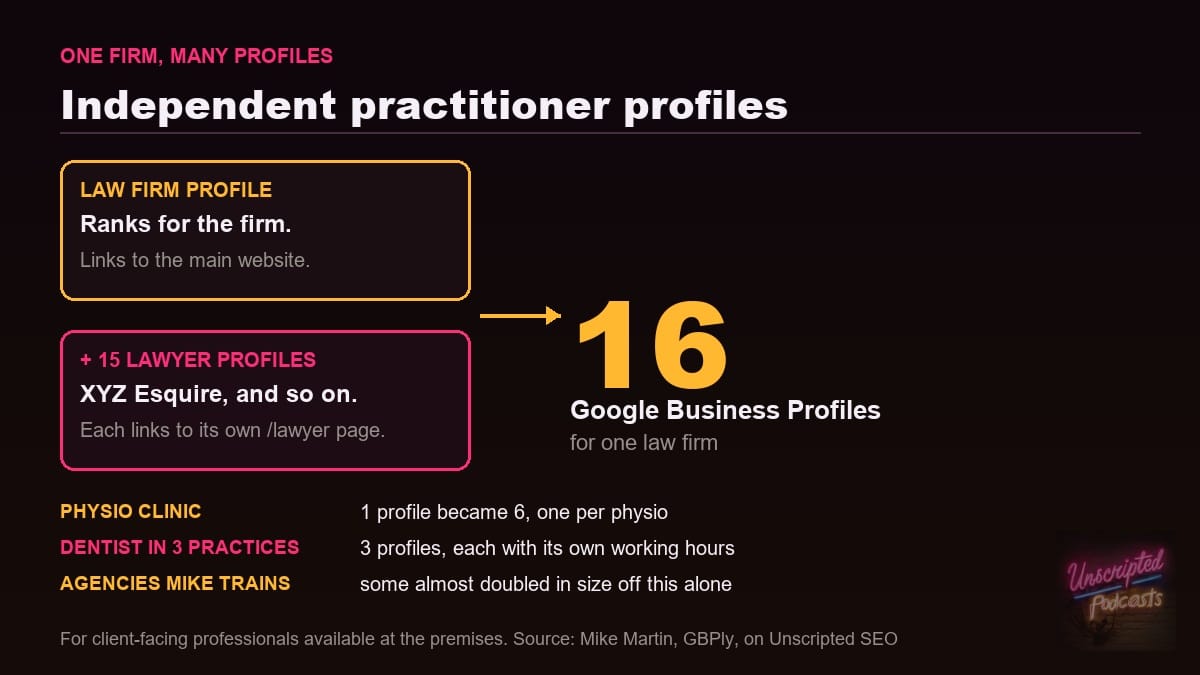
You finish with one Google Business Profile for the organization plus one profile for each client-facing professional who works there, and each practitioner profile links to that person’s own page on the website. A physio clinic Mike worked with went from one profile to six, one per physio. A law firm with 15 lawyers could run 16. Mike’s reason for doing it: the map pack is where a local business can rank for a single keyword like “dentist near me”, and those profiles sit directly under the AI overviews, above the websites.
Key Steps
- List every client-facing professional at the location. Google names doctors, dentists, lawyers, financial planners and insurance or real estate agents as individual practitioners. Mike’s test: they are available at the premises during working hours, and people can phone up and ask for them by name. Leave support staff off the list – Google’s guidelines say they should not get their own profile.
- Check the organization’s own profile first. It should be complete and should mirror the website – name, address, hours, categories and services. Mike treats that mirroring as the foundation of everything else on a profile. (inferred – Mike describes mirroring for every profile, not this order specifically)
- Build a page for each practitioner on the website. One URL per person, under their own name – /lawyer-one, /lawyer-two and so on, as Mike puts it. Include their title, what they handle and their hours at this location. Mike: “what really builds the entity for you is every single lawyer has a forward slash lawyer one, forward slash lawyer two, forward slash lawyer three on the website.”
- Create one profile per practitioner, named as the person. When several practitioners share a location, Google wants the practitioner profile named for the person only, with a title or degree allowed – “XYZ Esquire”, “Dr. Jane Smith”. Keep the firm’s name off it; the firm has its own profile.
- Link each profile to its own page, not the homepage. The organization profile links to the main website. Each practitioner profile links to that practitioner’s page. This is the part Mike says ties the entity together.
- Set hours per location for anyone who works in more than one place. Mike has seen a dentist who works across three practices in a week run three practitioner profiles, one per practice, each with that practice’s working hours.
- Verify, then put every profile on the GBP loop. Each profile gets the same monthly cycle as the main one: profile completeness and mirroring, pictures, posts and praise (reviews and review responses). Mike’s line on it: “It doesn’t have an end date.”
Cautionary Notes
- One profile per practitioner per location. Google says a practitioner should not have several profiles to cover different specialties.
- If the practitioner is the only public-facing professional at a branded location, Google wants a single shared profile named “Brand: Practitioner Name” instead of two profiles.
- Sales associates and lead generation agents are not eligible. Neither is support staff.
- Mike has not tested this outside the professions Google names. When Jeremy asked about tattoo artists, Mike said he had never tested it and would not say yes or no.
- Do not show the address on a profile for someone who serves customers away from the premises. Mike calls showing an address as a service area business a breach of Google’s terms.
Tips for Efficiency
- Look for the gap first. Mike’s pattern: the firm’s profile already ranks number one, but none of its lawyers have a profile. That firm is the fastest win.
- Run it as a short working session. Mike takes agencies through setup in a 30-minute meeting.
- Collect the inputs once for everyone: a name, title, photo, page URL, phone line and hours for each practitioner, in one sheet. (inferred)
- Use a free map grid rank tracker to watch each new profile spread across the area. GBPly offers 10 free scans a month.
Sources & Relevant Episodes
- Mike Martin, GBPly – described setting up independent practitioner profiles for a physio clinic (one profile to six), a law firm (one to 16) and a dentist working at three practices, and said some of the agencies he trains almost doubled in size from this alone. More from Mike at mikemartin.uk.
- Google’s rules for practitioners: Guidelines for representing your business on Google.
- Read the full interview: Mike Martin on the GBP Loop: Google Business Profiles Have No End Date, and watch it on YouTube.
- Related on SEO Arcade: Google Business Profile optimization, the local citations guide and set up GBP conversion tracking first.